OPEN SOURCE · BUILT FOR ENGINEERING TEAMS

Open-source AI development platform for engineering teams.

A source-backed field guide to what MonkeyCode actually does.

Where it differs from editor assistants, and what a team should verify before hosted or self-hosted adoption.

FREE FOREVERFree cloud dev environment + 10M tokens/day (resets daily) — no install, run in the browser.
  • Designed forManaged agent work
  • Runs onShared engineering environments
  • Not justLocal autocomplete
FREE TO START

Open the browser, create an account, and run tasks in a managed cloud environment with no local setup. Plans and quotas are set by the vendor and can change; verify current terms.

Free cloud environmentThe free Basic plan runs in a managed cloud dev environment (1 vCPU / 4 GB) — nothing to install locally.
10M tokens/dayResets every day — free quota on the basic model, per the hosted service’s published plans.

What you can build

From a quick prototype to a shipped feature.

Describe the goal and MonkeyCode runs the task in a cloud environment. Example uses documented on the hosted service.

# game

Build a small game

Describe the gameplay; AI scaffolds the project, handles collision and sound, and produces a playable version.

# feature

Implement a feature

Drop in the requirement; AI reads the repository, edits files, runs tests, and opens a pull request.

# security

Security review

AI scans for common vulnerabilities, hardcoded secrets, and dependency risks, then outputs a fixable list.

# paper

Write a thesis

AI searches literature, outlines sections, runs experiment code, draws charts, and formats the draft.

# data

Data analysis

Upload a CSV; AI cleans the data, models it, draws charts, and writes readable conclusions.

# research

Product / tech research

AI gathers public information and produces cited comparison reports for technical selection.

Try these free in the browser
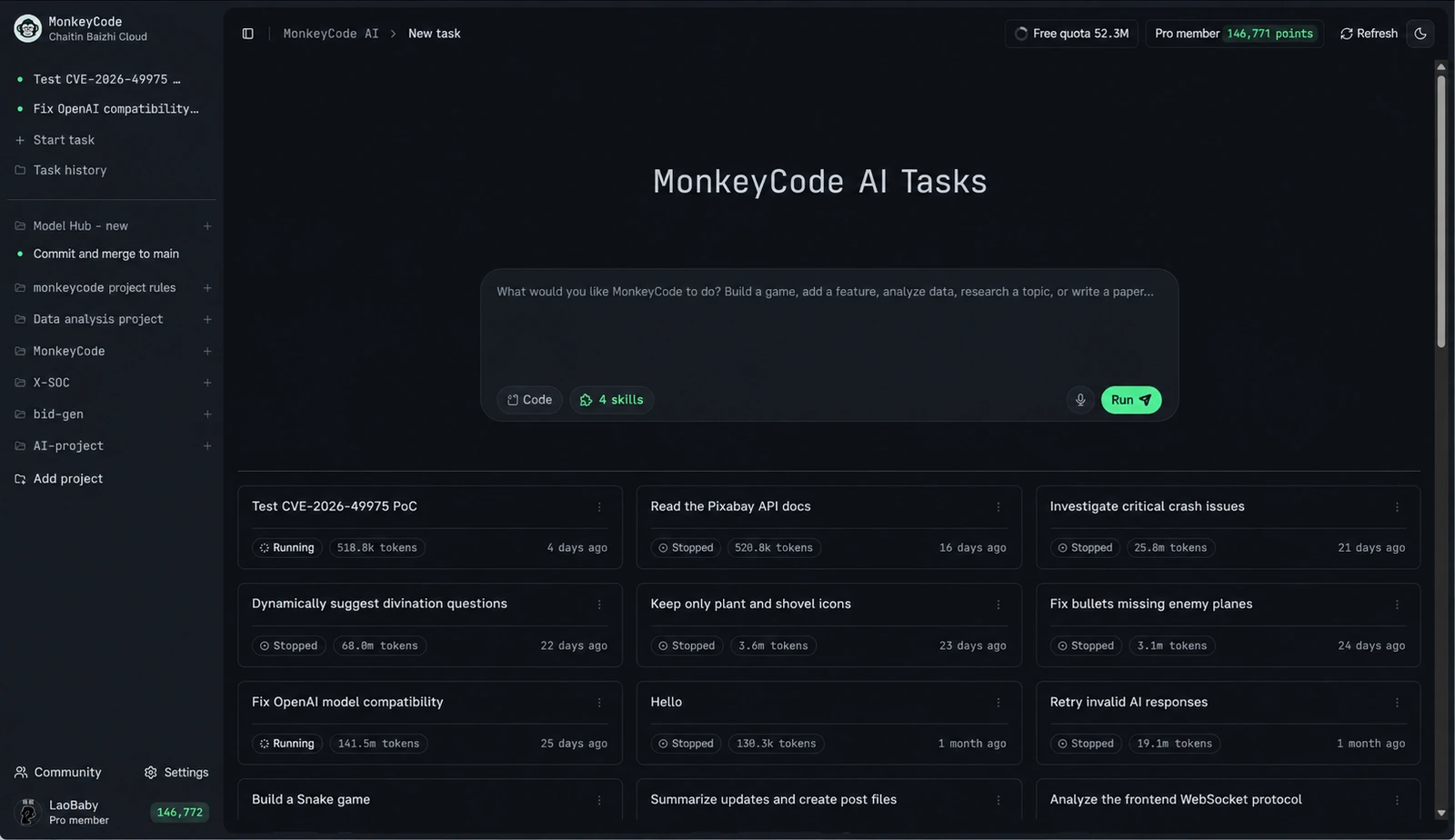
MonkeyCode AI task workspace with requirements, task execution, and a server-side development environment in the browser
The AI task workspace runs in a managed cloud environment. Official product image; interface details change by release.
LAST VERIFIED2026-08-05
SOURCE TYPEOfficial project sources
PROJECT STATUSOpen source · AGPL-3.0
FAST PATHRead direct answers →

Decision snapshot

Start with fit, not features.

MonkeyCode makes the most sense when the coordination and execution layer is the problem. If your only problem is typing code faster, a lighter tool is usually the cleaner answer.

STRONGER FIT WHEN

Your team needs a shared agent workflow.

  • Reproducible execution.Tasks must run in server-side environments, not on one laptop.
  • Connected history.Requirements and execution results stay linked to the work.
  • Team visibility.Engineering leads need oversight beyond a single developer.
  • Deployment control.Private deployment or model choice is a real constraint.
WEAKER FIT WHEN

You mainly want faster local editing.

  • Autocomplete-first.Predictive suggestions are the primary workflow.
  • IDE-bound.All work must stay inside an existing local editor.
  • No infra appetite.You do not want to operate development environment hosts.
  • Solo developer.A single user with no shared governance requirement.

Category map

The useful comparison is the operating model.

“AI coding tool” hides several distinct jobs. MonkeyCode sits further from the cursor and closer to a shared execution system.

01LOCAL / IMMEDIATE

Completion

Predict the next edit while a developer remains in direct control.

Optimizes: keystrokes
02LOCAL / CONVERSATIONAL

IDE or CLI agent

Explore a repository, propose or execute changes from a developer’s workstation.

Optimizes: individual loop
03MANAGED / SHARED

MonkeyCode

Connect requirements, agent tasks, development environments, projects, and team oversight.

Optimizes: coordinated execution
04ORGANIZATIONAL

Internal platform

Add policy, approved models, infrastructure, access controls, and operations.

Optimizes: governance
See the complete workflow comparison

Original tool

60-second MonkeyCode fit check.

This is a directional screen, not a product score. Select the conditions that describe your intended workflow.

Method: the check weighs needs that match the platform’s documented operating model. It intentionally penalizes a local-autocomplete-only use case.
YOUR RESULTSelect the statements above.

We will map your needs to the documented platform model.

Evidence ledger

Claims separated from interpretation.

We separate documented capabilities from evaluation guidance and the questions that still require validation in your own environment.

Documented capabilityWhat it meansOfficial source
F-01The project positions MonkeyCode as an open-source AI development platform for engineering teams.It competes at the workflow and environment layer, not primarily as an editor autocomplete tool.MonkeyCode project README ↗
F-02Tasks can run in server-side development environments with build, test, terminal, and preview workflows.The execution environment is a core part of the product thesis.MonkeyCode project README ↗
F-03The public project lists GLM, Kimi, MiniMax, Qwen, DeepSeek, and other models.Model choice is managed at platform level; exact availability should be checked before adoption.MonkeyCode project README ↗
F-04The repository is licensed under GNU AGPL-3.0.The code is auditable and forkable, with license obligations that organizations should review.AGPL-3.0 license ↗
F-05The project documents hosted use and private, offline deployment.Teams can evaluate the workflow before deciding whether to operate the stack themselves.MonkeyCode project README ↗
F-06As of 2026-07-30, the public chaitin/MonkeyCode repository has 3.9k+ GitHub stars.Stars are a real, verifiable measure of developer interest — an adoption signal, not a guarantee of production suitability.MonkeyCode GitHub repository ↗

News and research

Current evidence, useful beyond one product.

Source-checked AI coding news plus practical material on agent architecture, self-hosting, engineering governance, and evaluation.

Browse AI coding news Browse all research

What developers say

Real feedback from teams using MonkeyCode.

Feedback from developers using the hosted MonkeyCode service; some identifying details are generalized for privacy. Source: monkeycode-ai.net ↗

What I value most is that it is device-agnostic: a computer at the office, a tablet at home, a phone to check progress. Tasks keep running.
AjieIndependent developer
Setting up environments used to take a lot of time and felt tedious. After using MonkeyCode a lot of that wasted effort disappeared—it works out of the box and lets me focus on the actual product.
Time TravelerIndependent developer
The agent can connect to the terminal, reason, and execute autonomously, which makes hands-off programming feel real—with fast, no-limit free models.
FullSecurity engineer
It is an AI-native development tool with practical AI + Dev capabilities across the full workflow: it helps write code, understands the project, executes tasks, and assists with debugging.
Xiao TantanSolo founder
Development does not require opening a local IDE, and unfinished tasks can continue on the phone. This feels like the future.
CleverFull-stack engineer
It is my first choice for daily projects and coursework. AI-assisted generation is efficient, environments start in seconds, and I do not have to fight local configuration.
Situ BeiStudent developer
No starting barrier—register and use it, and it is free. Open the browser and go from requirements to development, testing, and commits.
Dark StreetTechnical lead
The best part is the isolated runtime environment: it starts quickly and can generate a public URL after the build finishes. Configure your own models, or use the free built-in ones.
aiwenmingProduct management

Direct answers

Questions search engines—and buyers—ask.

Concise answers first. Nuance and primary sources one click deeper.

What is MonkeyCode?
MonkeyCode is an open-source AI development platform for engineering teams. It combines AI task and requirement management with server-side development environments, model management, project workflows, and private deployment.
Is MonkeyCode a Cursor or Copilot replacement?
Not directly. Cursor-style tools optimize the developer’s local editing loop. MonkeyCode is designed around managed AI tasks, shared requirements, cloud execution, and team visibility. Some teams may use both categories together.
Can MonkeyCode be self-hosted?
Yes. MonkeyCode supports private deployment. Published starting minimums are 2 CPU cores, 4 GB memory, and 40 GB storage for the console, plus 8 CPU cores, 16 GB memory, and 100 GB storage for a development environment host.
Is self-hosting enough to keep all code private?
Not automatically. Teams must also verify model endpoints, network routes, logs, credentials, backups, and environment isolation. A self-hosted control plane can still call an external model provider.
Who is MonkeyCode for?
MonkeyCode is for developers, engineering leaders, and platform teams that need managed AI tasks, shared requirements, server-side development environments, model choice, and private deployment.
START BUILDING

Try the hosted experience or deploy MonkeyCode yourself.